
Medical package guide
Step by step, with examples. The same chapter is in the app under Help › Guide, with a practice field and the Medical practice.
Medical package
With the Medical package VoxaFlow writes medical terms, drug names, values and dosages the way they belong in a doctor’s letter or a patient record. You dictate as usual into your practice software, into Word or into an email. Speech and text are processed only on your computer. The writing rules are made for German dictation.
Said: metoprolol fünfzig milligramm eins null eins blutdruck hundertvierzig zu neunzig
Written: Metoprolol 50 mg 1-0-1, Blutdruck 140/90 mmHg.
Set up in four steps
- Open VoxaFlow (icon in the menu bar › Open VoxaFlow …) and choose Packages on the left.
- Switch on Use the Medical package. The word lists appear below, for example general medicine, cardiology, drugs or nursing. Switch on the areas you work in. More does no harm; the first download just takes a moment longer.
- Under Practice software, click Add app … and choose your practice system, for example tomedo. VoxaFlow then writes there in the style “Findings and notes”.
- Do you work through Remote Desktop or Citrix? Then there is nothing more to do: VoxaFlow types the text into the session window. More below under “Remote Desktop and Citrix”.
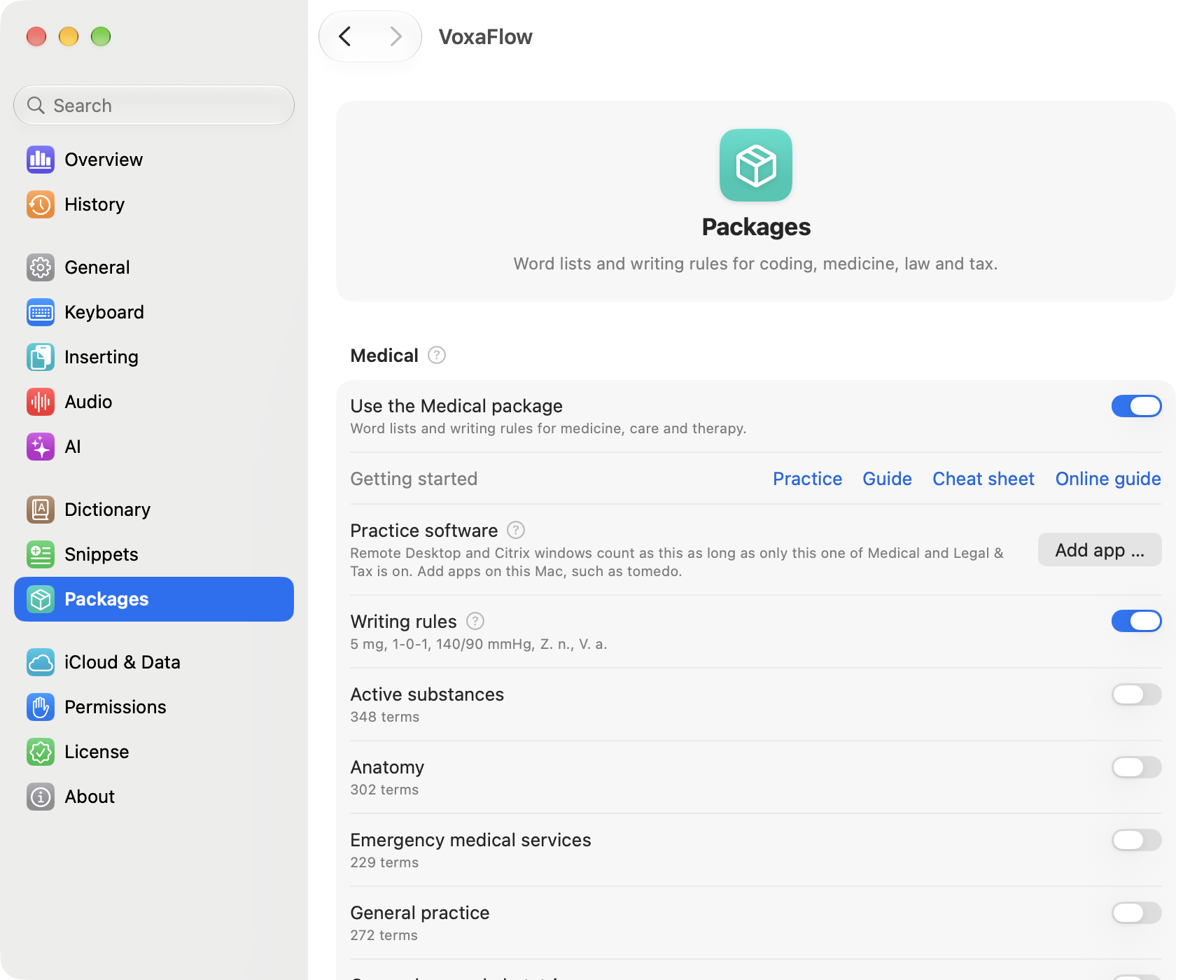
Under Help › Medical practice … you try everything in three minutes with example sentences.
How to dictate
Click where the text should go. Hold the fn key, speak and release it. The text appears after a moment.
- Speak naturally and in full sentences. You do not need to say punctuation.
- Simply say numbers, values and dosages: “fünfzig Milligramm”, “hundertvierzig zu neunzig”.
- Feel free to correct yourself mid-sentence: “fünf, nein, zehn Milligramm” becomes “10 mg”.
- For longer dictations, tap fn twice. Then you do not need to hold the key. Press fn once to end.
Values, dosages and abbreviations
| You say | VoxaFlow writes |
|---|---|
| fünf Milligramm | 5 mg |
| zwei Komma fünf Milligramm | 2,5 mg |
| eins null eins | 1-0-1 |
| Blutdruck hundertvierzig zu neunzig | Blutdruck 140/90 mmHg |
| ASS hundert | ASS 100 |
| Zustand nach Appendektomie | Z. n. Appendektomie |
| Verdacht auf Pneumonie | V. a. Pneumonie |
| am dreizehnten Oktober | am 13. Oktober |
VoxaFlow adds no numbers or dates you did not say and leaves none out. If the cleanup adds something anyway, VoxaFlow uses the text with the fixed rules only. You can switch these rules off under Packages › Writing rules.
Letters with sections
Start a section with “Abschnitt” and its name, for example “Abschnitt Befund”, or say the name followed by “Doppelpunkt”: “Procedere Doppelpunkt”. VoxaFlow sets the heading. Recognized names include Anamnese, Befund, Diagnose, Beurteilung, Therapie, Procedere, Medikation, Verlauf and Epikrise.
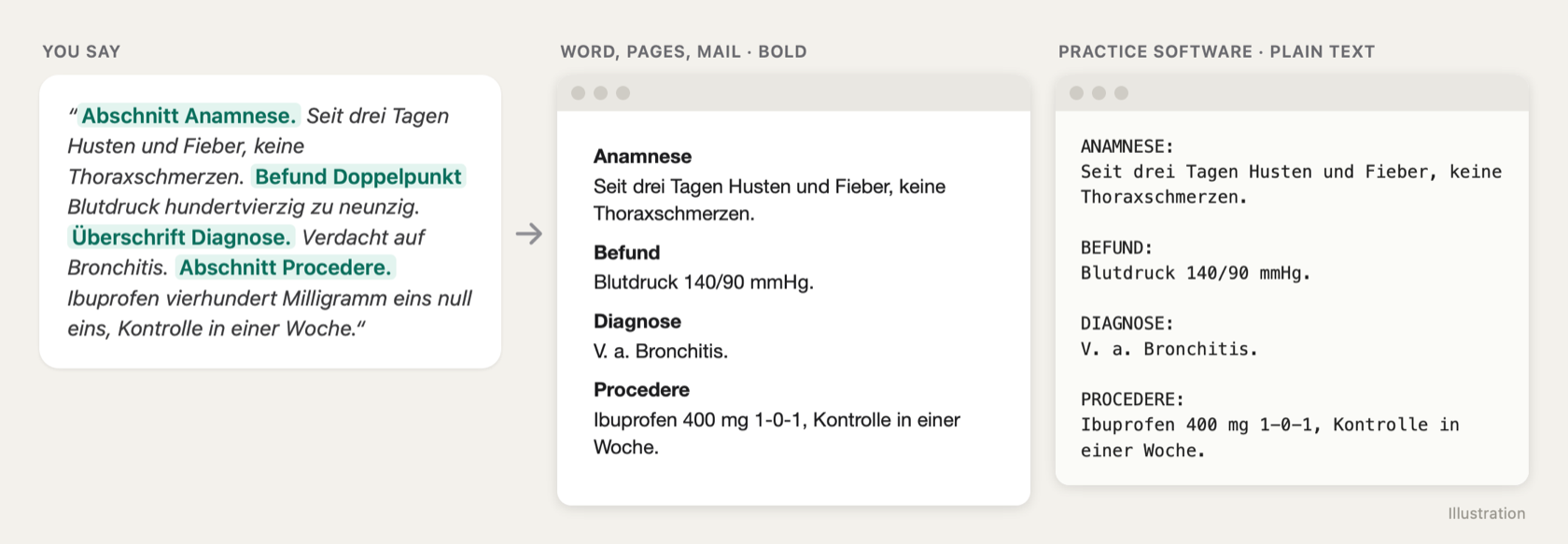
Said: abschnitt befund lunge frei abschnitt procedere kontrolle in einer woche
Written: Practice software:
BEFUND:
Lunge frei.PROCEDERE:
Kontrolle in einer Woche.
In Word, Pages and Mail the headings are bold, in practice software they appear in capitals. A sentence such as “Der Befund ist unauffällig” stays an ordinary sentence.
When a word is spelled wrong
If VoxaFlow spells a name or a rare term wrong, add it to the dictionary: select the word and choose History › Add selection to dictionary … in the menu bar menu. From then on VoxaFlow always writes it that way. To rework a finished text, use command mode: select the text, hold fn together with Control and say what should change, for example “make this more formal”.
Confidentiality and privacy
- Your speech and your text are recognized and cleaned up only on this computer. VoxaFlow sends neither audio nor text to the internet.
- As soon as the package is on, professional secrecy mode applies: new dictations are not kept in the history. If you want to keep them for a while, switch on Keep dictations in the history under Packages and choose 24 hours, 7 or 30 days. The history is never synced via iCloud.
- Under Packages you save “What VoxaFlow sends” as PDF … for your record of processing activities. It lists which servers VoxaFlow contacts and why, for example for updates and the license.
Remote Desktop and Citrix
VoxaFlow runs on the computer you sit at and writes the finished text into the Remote Desktop or Citrix window. Your practice software in the session receives it as if you had typed it. This also works when the session blocks the clipboard. Long texts take a few seconds. Under Packages › Remote Desktop and Citrix you choose Typing or Clipboard for each client; clipboard is faster but needs a shared clipboard.
What VoxaFlow does not do
VoxaFlow writes what you dictate. It summarizes nothing, does not evaluate findings and suggests no diagnoses or codes. Check the text as you would a document you typed yourself.
Frequently asked questions
Do I need internet? Only once to download the models and word lists. After that you can dictate offline.
Does it work in my practice software? VoxaFlow writes into any program you can type into. If a program does not accept the text, it is on the clipboard and you paste it with ⌘V.
Do I have to speak very clearly? No. Speak normally, as with a dictation device. A good headset helps in noisy rooms.
What does the package cost? During the beta everything is free. From January 1, 2027, Pro costs €49 and the Medical package €40, a one-time purchase without a subscription. Practices get 5 seats for the price of 4.
Who helps me set it up? Write to us via Help › Send Feedback … or at hello@voxaflow.ai. A guide with pictures is also at voxaflow.ai/docs/medical.